

01 · MY PREPARATION
Know what to study today, and see how far you have come
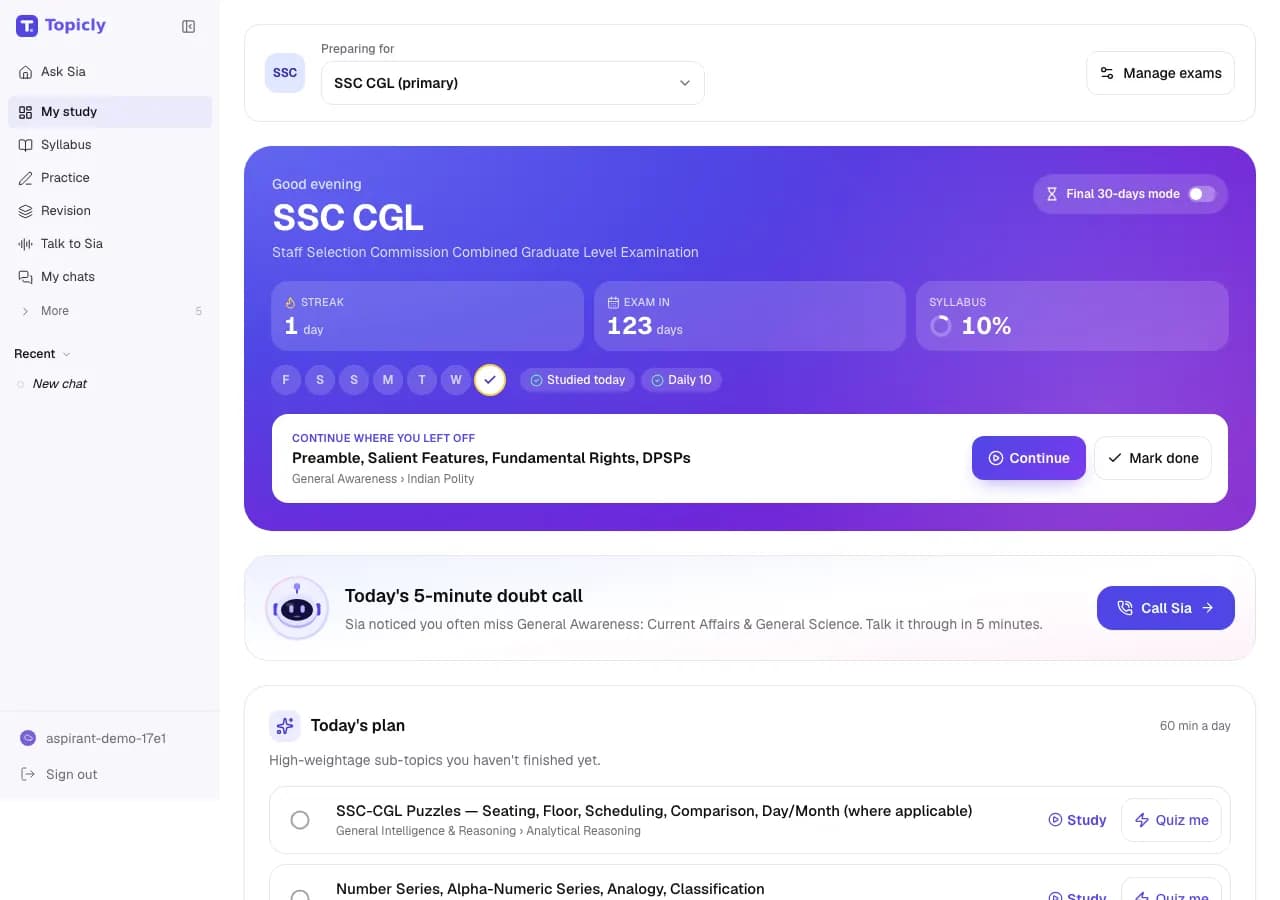
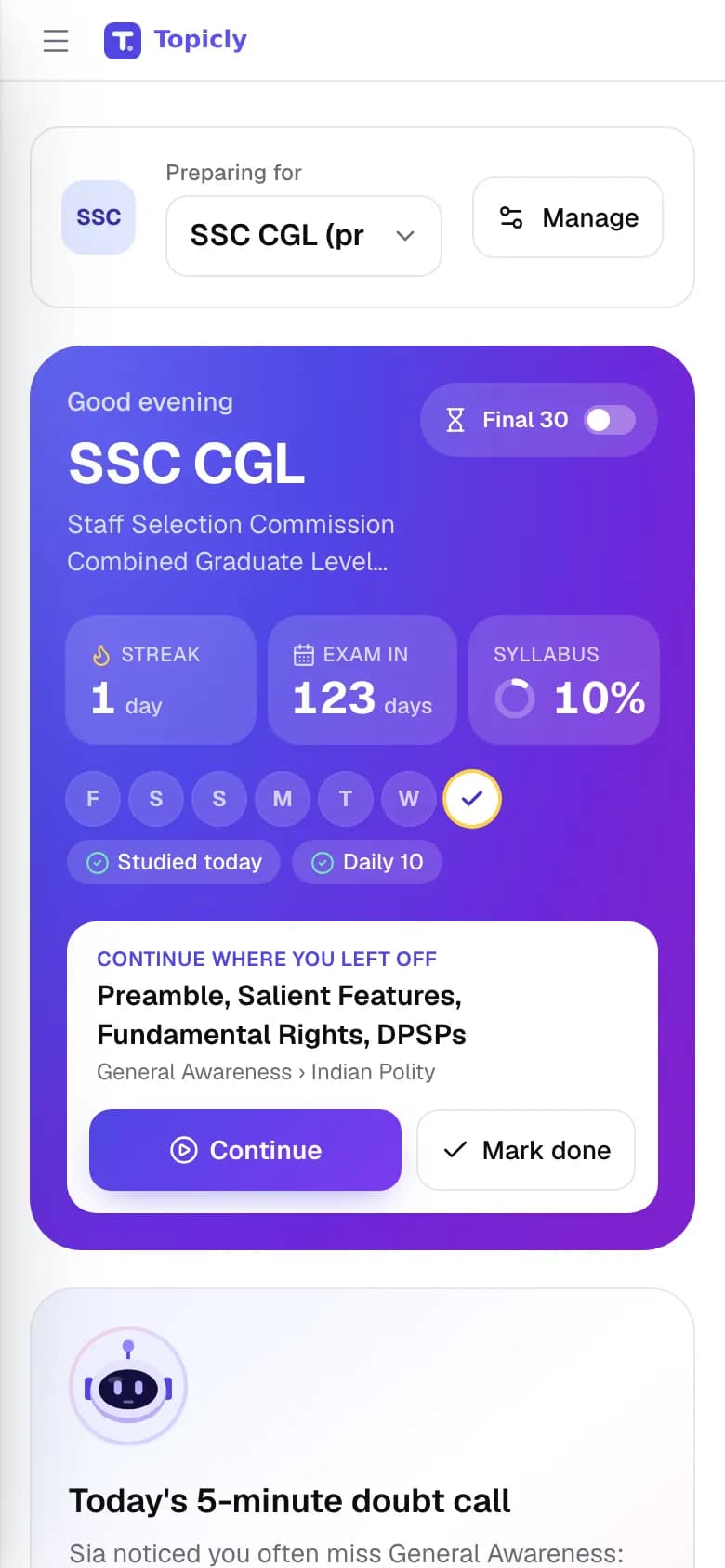
My Preparation is your home page after you sign in. It shows today’s plan, the days left to your exam, your study streak and how much of the syllabus you have finished.
“I study every day, but I can’t tell if I’m on track.”
WALKTHROUGH
How to use My Preparation, step by step.
Tell Topicly your exam, your exam date and how much time you can study each day.
Open My Preparation every day. Start with Today’s plan, then the Daily 10 and any flashcards that are due.
Tap Study on a topic and mark it done when you finish. Your syllabus progress, streak and weak topics update as you go.
EVERY FEATURE IN MY PREPARATION
What you can do, and why it helps.
- 01
Today’s plan
Up to three sub-topics to study today, picked for you from your exam’s syllabus.
- How it works
- Topicly picks sub-topics you have not finished. Subjects with more weight in the exam come first, then topics worth more marks. Anything you worked on in the last 24 hours is left out. Each topic has Study, Quiz me and Mark done buttons.
- How it helps
- You stop wondering what to study and start straight away.
- 02
Exam countdown
The number of days left until your exam.
- How it works
- Add your exam date during setup, or tap Set date later. If the date is not announced yet, skip it and add it when it is.
- How it helps
- You always know how much time is left, so you can pace the syllabus.
- 03
Study streak
How many days in a row you have studied, with a strip showing which days you studied this week.
- How it works
- A day counts when you do real study on Topicly: start or finish a topic, complete a quiz, Daily 10 or mock, review flashcards, make a note or tick off a planner task. Miss a whole day and the streak starts again.
- How it helps
- Small daily wins are easy to see, which makes the habit easier to keep.
- 04
Syllabus progress
The share of your exam’s syllabus you have finished, as a percentage.
- How it works
- Each sub-topic counts once. It counts as finished when you mark it Done or Confident. Opening a topic only marks it In progress, which does not count yet.
- How it helps
- You get an honest number for what is covered and what is left.
- 05
Continue where you left off
The topic you were last working on, with Continue and Mark done buttons.
- How it works
- It shows the most recent sub-topic that is still In progress.
- How it helps
- You pick up exactly where you stopped yesterday.
- 06
Daily 10 and today’s shortcuts
One-tap links to the Daily 10, a 10-question quick quiz, mock tests, flashcards due today, your mistakes, the revision planner and current affairs.
- How it works
- Shortcuts show live counts, such as how many flashcards are due. The quick quiz uses your weakest topic, or the first topic of today’s plan.
- How it helps
- Everything that needs attention today is one tap away.
- 07
Your whole syllabus
The full syllabus of your exam on the same page, with search and status filters.
- How it works
- Search for a sub-topic such as “percentage”, or filter by Unfinished, Review due or Checked. Review due marks sub-topics with mistakes that are due for another look.
- How it helps
- You find your place in seconds instead of scrolling a long list.
- 08
Weak topics
Up to three topics where your accuracy is lowest.
- How it works
- A topic appears after you answer at least 3 questions on it and get fewer than 60% right. Tap Quiz me to practise it straight away.
- How it helps
- You see what is pulling your score down before your next mock.
- 09
Your 7-day fix-up plan
A day-by-day plan for the coming week, built from your weak and slow topics.
- How it works
- It uses your quiz results from the last 30 days. Topics under 75% accuracy, or clearly slower than the target pace, get a day each. Days 4 and 7 are mixed revision of due mistakes and flashcards.
- How it helps
- Finding a weak area turns straight into a plan for fixing it.
- 10
Final 30-days mode
A last-month layout: days left, mistakes to revise, flashcards due, a full mock and up to eight high-weightage topics you are not yet confident in.
- How it works
- It switches on by itself when your exam is 30 days away or less. Use the Final 30-days switch to turn it on or off yourself.
- How it helps
- Your last weeks go to revision and timed practice, not new topics.
- 11
Daily doubt call
A card that suggests a short voice call with Sia about a topic you often get wrong, or the one you talked about last time.
- How it works
- Tap Call Sia on the card. The call opens in Ask Sia AI.
- How it helps
- A five-minute talk can clear a doubt that has been stuck for weeks.
- 12
Your daily study time
Your daily study goal (30 minutes, 1 hour, 1.5 hours or 2 hours or more), and a Time studied card showing the minutes you actually studied today and over the last 7 days.
- How it works
- Set the goal during setup and change it any time. Minutes count while you are active in quizzes, mocks, Revision Hub and chats with Sia; the clock pauses when the tab is hidden or you have been idle for 5 minutes.
- How it helps
- You can see whether you are really putting in the hours, and your plans fit the time you have.
How Topicly counts your progress
No hidden scores. These are the exact rules behind the numbers on My Preparation.
- A finished sub-topic
- You marked it Done or Confident. Opening it to study marks it In progress, which does not count as finished yet.
- Syllabus %
- Finished sub-topics divided by all sub-topics in your exam, rounded to a whole number. A topic without sub-topics counts as one.
- Each exam on its own
- If you prepare for more than one exam, each has its own percentage. My Preparation follows your main exam; Exam Syllabus shows the others.
- A study day
- Any real study on a day, by Indian time, marks it as studied. Study today or yesterday and your streak carries on.
- A weak topic
- At least 3 questions answered on it and less than 60% correct.
- Study time
- Topicly counts the minutes you actively study: quiz and mock time, Revision Hub, and chats with Sia. It pauses when the tab is hidden or you have been idle for 5 minutes. My Preparation shows today against your daily goal, plus the last 7 days.
IN YOUR PREPARATION
How aspirants use it.
- SSC CGL
Open My Preparation before work, finish the three topics in Today’s plan, then take the Daily 10 to keep your streak going.
- IBPS PO
Weak topics shows Data Interpretation under 60%. Tap Quiz me now, then follow the 7-day fix-up plan through the week.
- RRB NTPC
With 25 days left, Final 30-days mode is on: clear your mistakes and take a full mock instead of starting new topics.
Good to know
Needs a free account and an exam choice. Plans, counts and weak topics come from what you mark and practise on Topicly, so they grow as you use it. Study time counts the minutes you are active in quizzes, mocks, Revision Hub and chats with Sia. The doubt call card appears only where voice calls are available. Topicly does not guarantee exam results. Paid plans on the pricing page are proposed and cannot be bought today.
Ready to try My Preparation?