

FEATURES · BUILT FOR INDIAN EXAM ASPIRANTS
Everything you need, from the first topic to exam day.
- exam syllabuses
- 270
- features in 13 areas
- 84
- tutor reply languages
- 11
01 · MY PREPARATIONStart here
Know what to study today, and see how far you have come
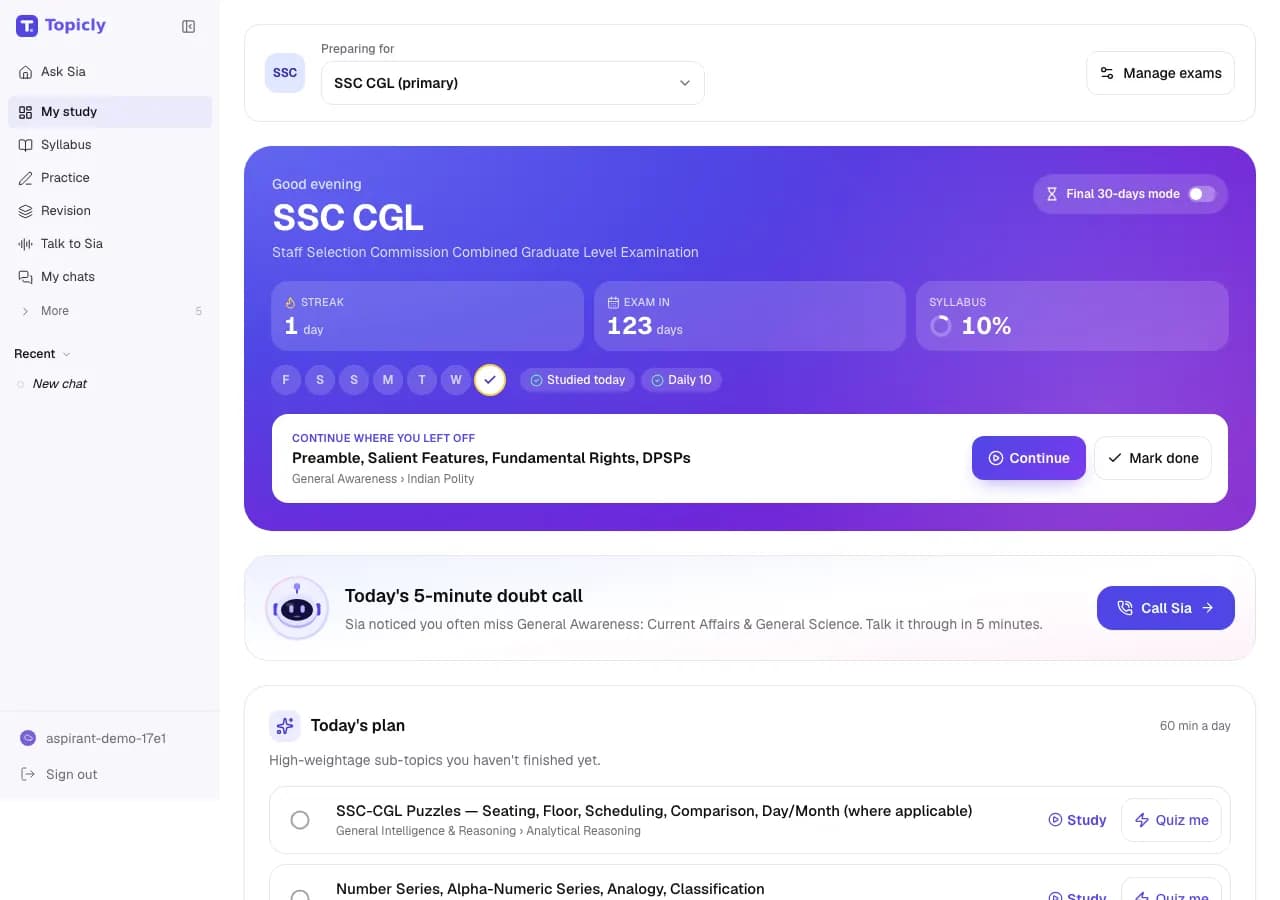
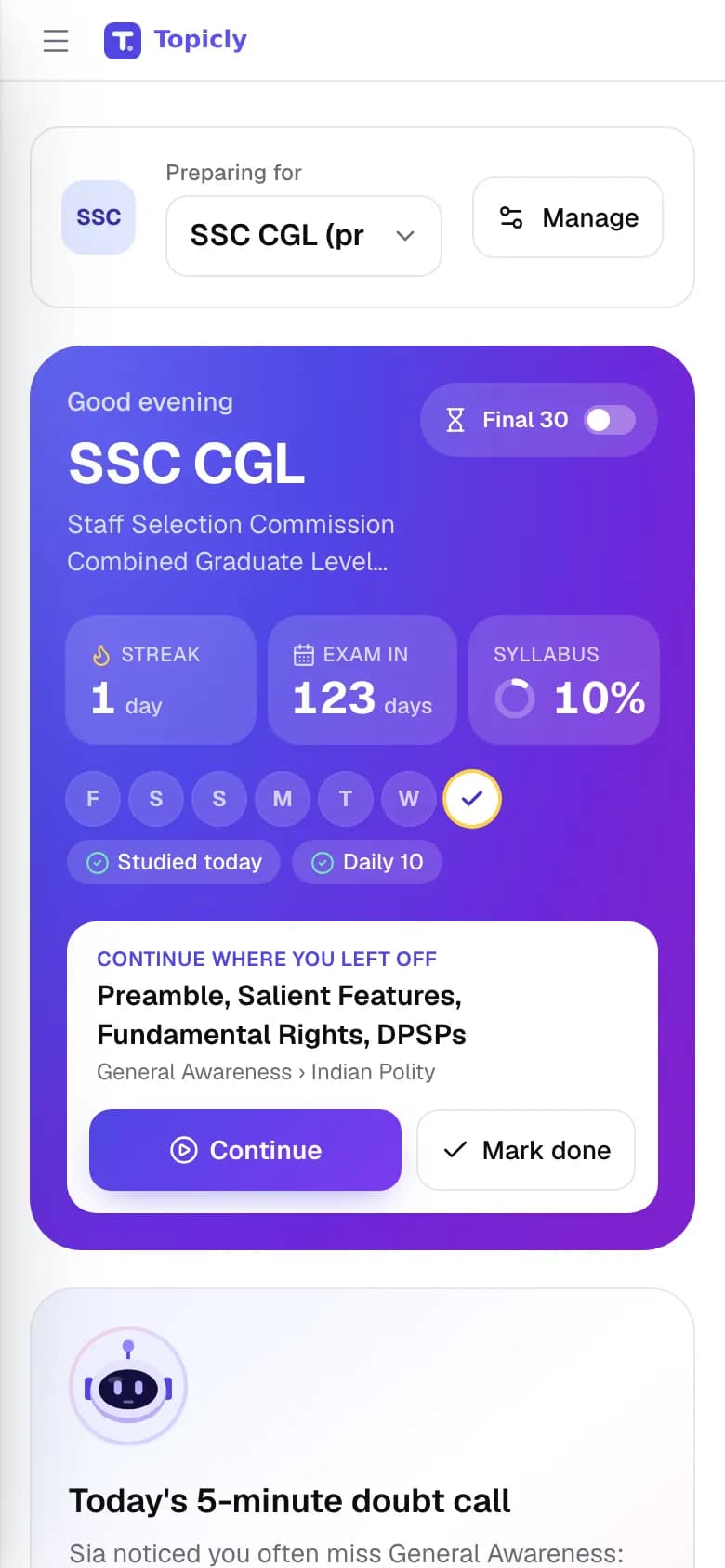
My Preparation is your home page after you sign in. It shows today’s plan, the days left to your exam, your study streak and how much of the syllabus you have finished.
Sounds familiar? “I study every day, but I can’t tell if I’m on track.”
- 01
Today’s plan
Up to three sub-topics to study today, picked for you from your exam’s syllabus.
- How it works
- Topicly picks sub-topics you have not finished. Subjects with more weight in the exam come first, then topics worth more marks. Anything you worked on in the last 24 hours is left out. Each topic has Study, Quiz me and Mark done buttons.
- How it helps
- You stop wondering what to study and start straight away.
- 02
Exam countdown
The number of days left until your exam.
- How it works
- Add your exam date during setup, or tap Set date later. If the date is not announced yet, skip it and add it when it is.
- How it helps
- You always know how much time is left, so you can pace the syllabus.
- 03
Study streak
How many days in a row you have studied, with a strip showing which days you studied this week.
- How it works
- A day counts when you do real study on Topicly: start or finish a topic, complete a quiz, Daily 10 or mock, review flashcards, make a note or tick off a planner task. Miss a whole day and the streak starts again.
- How it helps
- Small daily wins are easy to see, which makes the habit easier to keep.
- 04
Syllabus progress
The share of your exam’s syllabus you have finished, as a percentage.
- How it works
- Each sub-topic counts once. It counts as finished when you mark it Done or Confident. Opening a topic only marks it In progress, which does not count yet.
- How it helps
- You get an honest number for what is covered and what is left.
- 05
Continue where you left off
The topic you were last working on, with Continue and Mark done buttons.
- How it works
- It shows the most recent sub-topic that is still In progress.
- How it helps
- You pick up exactly where you stopped yesterday.
- 06
Daily 10 and today’s shortcuts
One-tap links to the Daily 10, a 10-question quick quiz, mock tests, flashcards due today, your mistakes, the revision planner and current affairs.
- How it works
- Shortcuts show live counts, such as how many flashcards are due. The quick quiz uses your weakest topic, or the first topic of today’s plan.
- How it helps
- Everything that needs attention today is one tap away.
- 07
Your whole syllabus
The full syllabus of your exam on the same page, with search and status filters.
- How it works
- Search for a sub-topic such as “percentage”, or filter by Unfinished, Review due or Checked. Review due marks sub-topics with mistakes that are due for another look.
- How it helps
- You find your place in seconds instead of scrolling a long list.
- 08
Weak topics
Up to three topics where your accuracy is lowest.
- How it works
- A topic appears after you answer at least 3 questions on it and get fewer than 60% right. Tap Quiz me to practise it straight away.
- How it helps
- You see what is pulling your score down before your next mock.
- 09
Your 7-day fix-up plan
A day-by-day plan for the coming week, built from your weak and slow topics.
- How it works
- It uses your quiz results from the last 30 days. Topics under 75% accuracy, or clearly slower than the target pace, get a day each. Days 4 and 7 are mixed revision of due mistakes and flashcards.
- How it helps
- Finding a weak area turns straight into a plan for fixing it.
- 10
Final 30-days mode
A last-month layout: days left, mistakes to revise, flashcards due, a full mock and up to eight high-weightage topics you are not yet confident in.
- How it works
- It switches on by itself when your exam is 30 days away or less. Use the Final 30-days switch to turn it on or off yourself.
- How it helps
- Your last weeks go to revision and timed practice, not new topics.
- 11
Daily doubt call
A card that suggests a short voice call with Sia about a topic you often get wrong, or the one you talked about last time.
- How it works
- Tap Call Sia on the card. The call opens in Ask Sia AI.
- How it helps
- A five-minute talk can clear a doubt that has been stuck for weeks.
- 12
Your daily study time
Your daily study goal (30 minutes, 1 hour, 1.5 hours or 2 hours or more), and a Time studied card showing the minutes you actually studied today and over the last 7 days.
- How it works
- Set the goal during setup and change it any time. Minutes count while you are active in quizzes, mocks, Revision Hub and chats with Sia; the clock pauses when the tab is hidden or you have been idle for 5 minutes.
- How it helps
- You can see whether you are really putting in the hours, and your plans fit the time you have.
How Topicly counts your progress
No hidden scores. These are the exact rules behind the numbers on My Preparation.
- A finished sub-topic
- You marked it Done or Confident. Opening it to study marks it In progress, which does not count as finished yet.
- Syllabus %
- Finished sub-topics divided by all sub-topics in your exam, rounded to a whole number. A topic without sub-topics counts as one.
- Each exam on its own
- If you prepare for more than one exam, each has its own percentage. My Preparation follows your main exam; Exam Syllabus shows the others.
- A study day
- Any real study on a day, by Indian time, marks it as studied. Study today or yesterday and your streak carries on.
- A weak topic
- At least 3 questions answered on it and less than 60% correct.
- Study time
- Topicly counts the minutes you actively study: quiz and mock time, Revision Hub, and chats with Sia. It pauses when the tab is hidden or you have been idle for 5 minutes. My Preparation shows today against your daily goal, plus the last 7 days.
START WITH YOUR GOAL
What do you need today?
Pick the problem in front of you. We will point you to the features built for it.
You want to know how far you have come and what is left.
- Track
Syllabus progress
You get an honest number for what is covered and what is left.
How it works - Track
Today’s plan
You stop wondering what to study and start straight away.
How it works - Track
Study streak
Small daily wins are easy to see, which makes the habit easier to keep.
How it works
BPSC: check your syllabus percentage each morning, follow Today’s plan and keep your streak going.
02 · EXAM SYLLABUS
See exactly what your exam asks, topic by topic
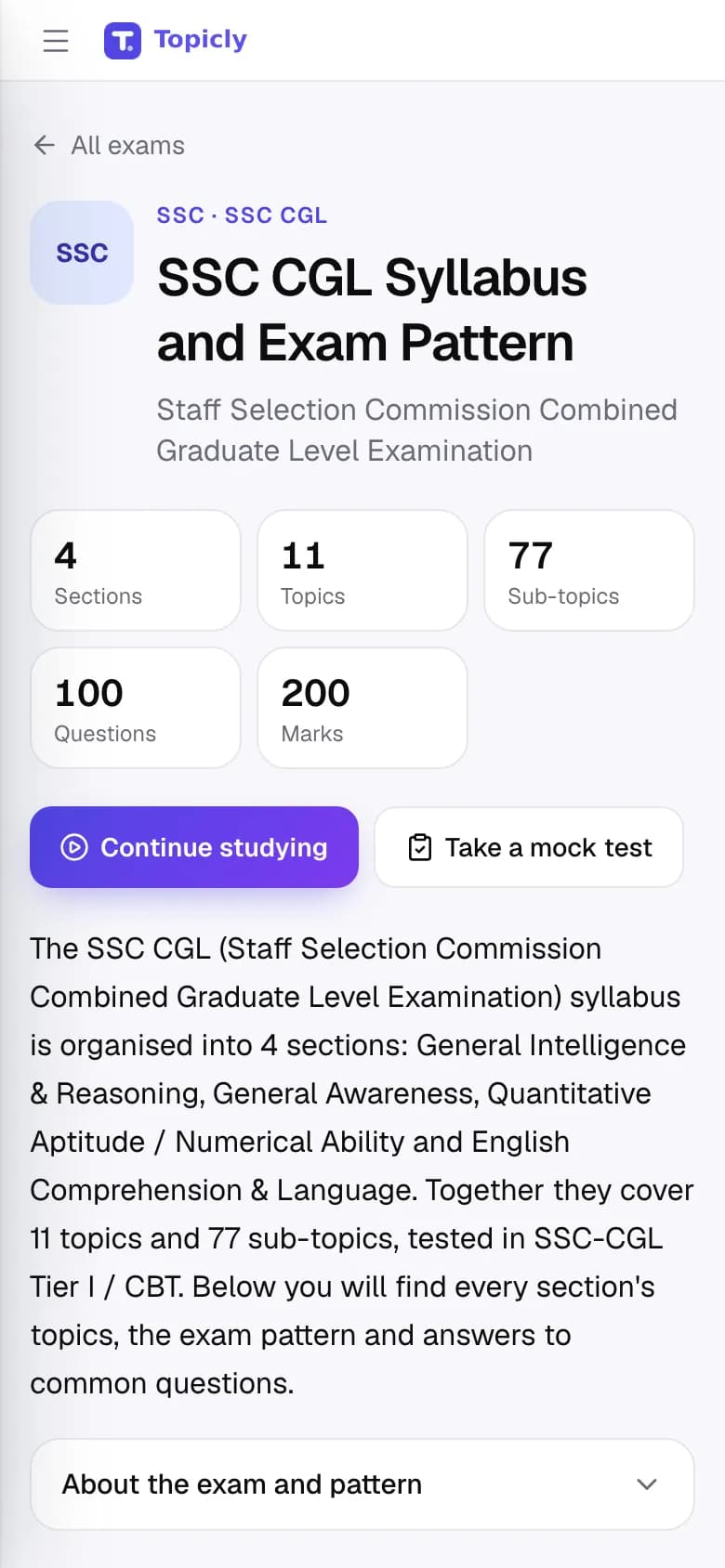
Exam Syllabus shows the full syllabus of your exam on one page, with the exam pattern and where the marks are. Tap any sub-topic to start studying it.
Sounds familiar? “I don’t know where to start.”
- 01
Exam syllabus explorer
Subject, topic and sub-topic syllabuses for 270 exams, from SSC and banking to railways, state PSCs, defence and teaching.
- How it works
- Search by exam name or browse by category. Syllabus pages are free to read without an account, in English and Hindi.
- How it helps
- You see what is in scope before you spend an hour on it.
- 02
Exam pattern and high-weightage topics
Tabs for the topics, the exam pattern, the high-weightage topics and common questions about the exam, with a chart of where the marks are.
- How it works
- Switch tabs at the top of any exam’s syllabus page, or turn on Only high-marks topics, where marks are known, to narrow the list.
- How it helps
- You spend more time on the topics that carry more marks.
- 03
A focused 30-minute session
A short list of sub-topics that fits the time you have: 15, 30 or 60 minutes.
- How it works
- Tap I have 30 minutes and pick a time. Topicly allows about 15 minutes per sub-topic and puts the highest-weightage ones first.
- How it helps
- Even a short break becomes a useful study session.
- 04
Mark your progress
Every sub-topic can be marked Not started, Learning, Done or Confident.
- How it works
- Tap the status next to a sub-topic to change it. Hide completed topics to see only what is left.
- How it helps
- You get an honest picture of what is finished and what is still left.
- 05
Micro-topics
A closer breakdown of a sub-topic into the smaller points it covers.
- How it works
- Tap Show micro-topics under a sub-topic. Some have a ready list; for others, Sia suggests one when you are signed in.
- How it helps
- A big sub-topic becomes a short checklist you can work through.
- 06
Progress for each of your exams
If you prepare for more than one exam, each one has its own card and progress bar.
- How it works
- Pick your exams during setup; they appear under My exams on the syllabus page.
- How it helps
- You can see how far along you are for every exam you are targeting.
- 07
Compare two exams
A side-by-side view of the subjects two exams share and the ones only one of them asks.
- How it works
- Open Compare exams and choose any two exams.
- How it helps
- You prepare for related exams together without studying the overlap twice.
03 · SIA – HOME
A patient tutor for the question in front of you
Sia is Topicly’s AI tutor. Type a doubt in your own words and Sia explains it, solves it step by step or teaches the same idea another way.
Sounds familiar? “I read the chapter but I still don’t get it.”
- 01
Explanations in your words
Sia explains a concept and answers follow-up questions about the exact step you are stuck on.
- How it works
- Type a question and choose a short, normal or detailed answer. Turn on Hint first to get a hint before the full solution.
- How it helps
- You clear one doubt properly instead of skimming three videos.
- 02
Study modes for every topic
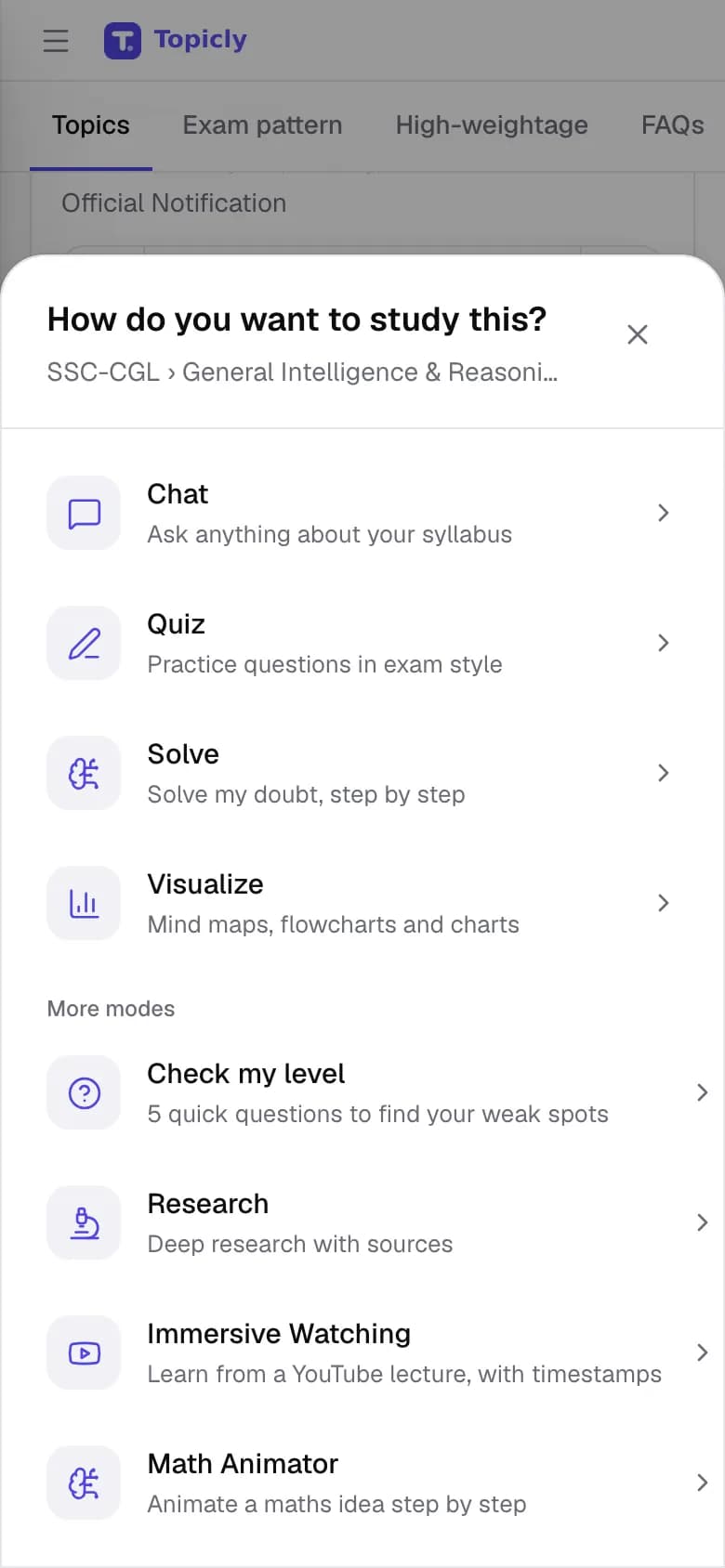
Different ways into the same topic: Chat, Quiz, Solve, Visualize, Check my level and Research.
- How it works
- Tap any syllabus sub-topic and pick a mode. You only see the modes your account can use.
- How it helps
- When one approach is not working, you can switch to another without starting over.
- 03
Step-by-step solving
Solve works through a problem one step at a time and explains the reason for each step.
- How it works
- Type the question, or use Snap a question to send a photo of it from a book or paper.
- How it helps
- You learn the method, which carries over to the next question.
- 04
Topic shortcuts
One-tap actions such as quiz me, show a short trick and check my answer.
- How it works
- Chats started from a syllabus topic remember your exam and topic, so the shortcuts stay on it.
- How it helps
- Less typing, and answers that match your exam rather than a general textbook.
- 05
Turn an answer into revision
Buttons under an answer to make flashcards, save a note, start a quiz or translate it.
- How it works
- Use them as soon as an explanation clicks; what you make appears in Revision Hub.
- How it helps
- A good explanation becomes something you can revise, not just read once.
- 06
Translate any answer
A Translate button under answers and quiz questions that shows the same text in another Topicly language.
- How it works
- Pick a language from the menu; the translation appears below the original.
- How it helps
- You can check a tricky term in Hindi or your home language without leaving the page.
- 07
Answers you can check
Answers that used the web list the sources they used.
- How it works
- Open a source to read it yourself. You can also pin an answer, or share it as an image.
- How it helps
- You can verify a fact before you rely on it in the exam.
- 08
Dictate your question
Speak your question into the chat box instead of typing it.
- How it works
- Tap the microphone in the chat box. For a full spoken conversation, use Ask Sia AI.
- How it helps
- Long or awkward questions are quicker to say than to type.
04 · ASK SIA AI
Ask your doubt out loud and hear the answer
Ask Sia AI is a voice call with your tutor. You speak, Sia answers aloud, and a live transcript keeps both sides on screen, like a call with your teacher.
Sounds familiar? “Typing out my doubt takes longer than asking it.”
- 01
Voice calls with Sia
A spoken conversation with Sia about your exam topics.
- How it works
- Tap Call Sia and talk. You can mute yourself, interrupt Sia mid-answer or end the call at any time.
- How it helps
- You clear a doubt in the time it takes to ask it.
- 02
Live transcript
Everything you and Sia say appears as text during the call.
- How it works
- Read along while Sia speaks, and copy the transcript to keep it.
- How it helps
- You do not lose an explanation just because you missed a word.
- 03
Call in your language
Choose the language Sia speaks on the call.
- How it works
- Pick it before the call starts. Exam words stay in English so they match your question paper.
- How it helps
- Concepts land faster in the language you think in.
- 04
Type instead
Switch to typing in the same call when speaking is not possible.
- How it works
- Tap Type instead and carry on the conversation in text.
- How it helps
- You can keep going in a quiet library or on a noisy bus.
- 05
Sia remembers your calls
Sia recalls what you asked last time and the topics you get wrong, and picks up from there.
- How it works
- Turn Sia remembers my calls off, or forget your past calls, at any time.
- How it helps
- You do not have to explain your weak areas again on every call.
- 06
A daily doubt call
A card on My Preparation that suggests a five-minute call about a topic you often get wrong.
- How it works
- Tap Call Sia on the card; the call opens with that topic already chosen.
- How it helps
- A short daily talk keeps one weak topic moving.
05 · MOCK & PRACTICE
Build speed and accuracy one question at a time
Mock & Practice has topic quizzes, a Daily 10 and full timed mock tests. Every question comes with an explanation, so each attempt teaches you something.
Sounds familiar? “I understand it, but I’m slow in the exam.”
- 01
Topic quizzes
Multiple-choice quizzes on any syllabus topic, with an explanation after every answer.
- How it works
- Pick a subject, topic and difficulty, or let the difficulty adjust as you go. Retry only the questions you got wrong.
- How it helps
- Short, focused practice right after you learn something.
- 02
Answer, then check
Choose an option, then press Check, so you can change your mind before you commit.
- How it works
- Works with touch or keyboard shortcuts. Explanations can be read aloud where your browser supports it.
- How it helps
- Fewer accidental taps, and the habit of reviewing an answer before you lock it in.
- 03
Daily 10
Ten questions a day for your exam, the same set for everyone preparing for it.
- How it works
- Open it while online and you can answer offline, then submit when you reconnect.
- How it helps
- A small daily habit that keeps every subject fresh, and it counts towards your streak.
- 04
Timed mock tests
Full mocks with sections, a timer, a question palette, marking for review and negative marking.
- How it works
- Warnings appear as time runs low, and an unfinished mock picks up again after a reload. Switch between English and Hindi where translations exist.
- How it helps
- You practise managing time under exam conditions before exam day.
- 05
Speed drill and sudden death
A race against the clock, and a round that ends at your first wrong answer.
- How it works
- Start either one from Mock & Practice. Results show your speed next to your accuracy.
- How it helps
- Builds the pace that sectional time limits demand.
- 06
Previous-year papers
Past papers for your exam, attempted inside Topicly.
- How it works
- Browse the papers an administrator has uploaded. Topicly does not invent papers that have not been added.
- How it helps
- You learn the real style and level of the exam.
06 · PERFORMANCE ANALYTICS
See where your marks are slipping
Performance analytics, inside Mock & Practice, shows your accuracy and speed by subject and topic, every attempt you have taken and a short plan for the topics that need work.
Sounds familiar? “I don’t know which topics are pulling my score down.”
- 01
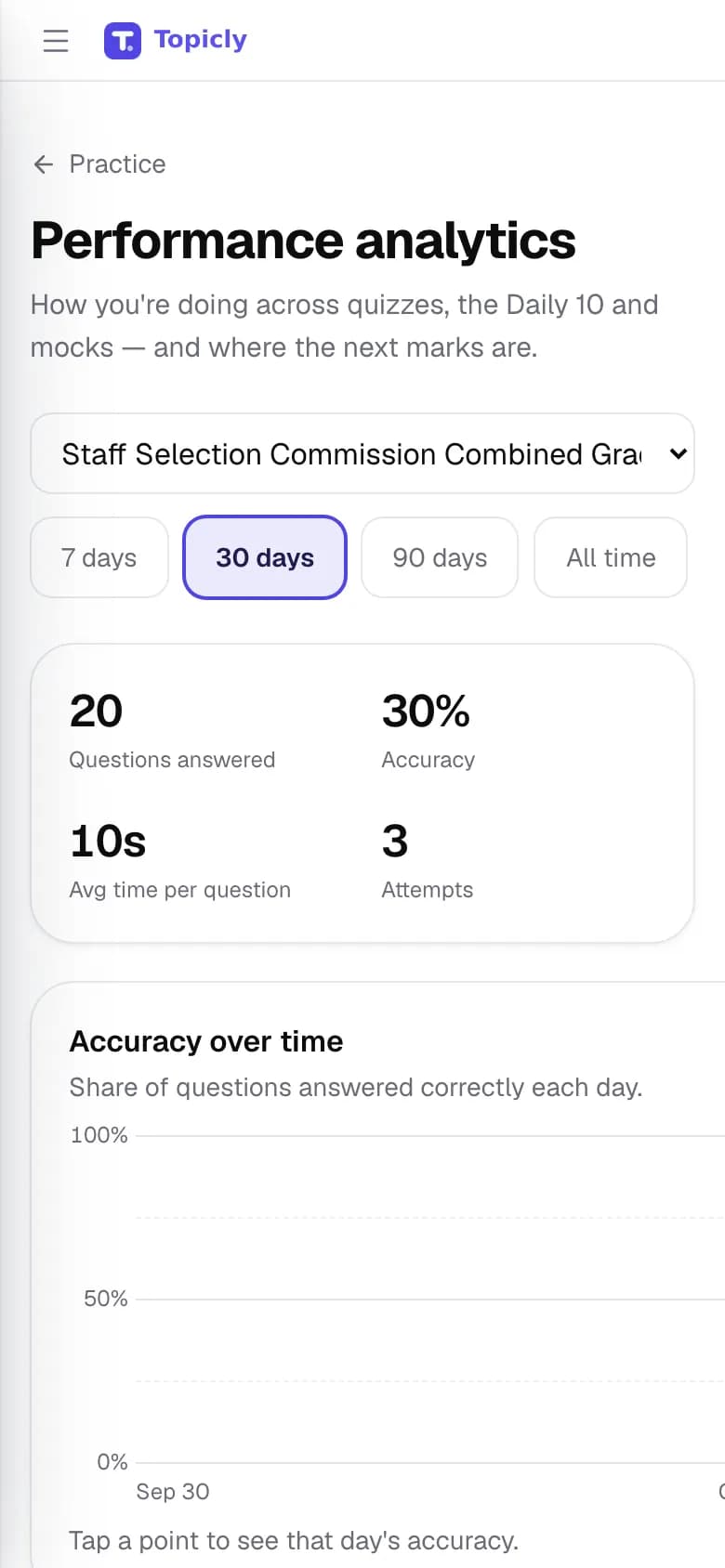
Performance analytics
Questions answered, accuracy and average time per question, across quizzes, the Daily 10, mocks and past papers.
- How it works
- Filter by exam and by the last 7, 30 or 90 days, or all time. Accuracy over time is charted day by day.
- How it helps
- You can tell whether this month’s practice is actually paying off.
- 02
Accuracy by subject
Your accuracy in each subject, most-practised first.
- How it works
- Built automatically from every attempt. There is nothing to set up.
- How it helps
- Strong and weak subjects are obvious at a glance.
- 03
Speed against target
Seconds per question for each topic, compared with the target pace for your exam.
- How it works
- Shown after your next quiz and updated with every attempt.
- How it helps
- You see whether a topic needs more understanding or simply more speed.
- 04
What is dragging your score down
Your lowest-accuracy topics, plus your strongest ones to keep fresh.
- How it works
- A topic appears once you have answered enough questions on it for the number to mean something.
- How it helps
- Your next study hour goes where it can lift your score the most.
- 05
Sure or guessing
Tag an answer as sure or a guess, and see how often your guesses were right.
- How it works
- Right answers you marked as guesses go to the mistakes notebook for another look.
- How it helps
- Lucky guesses stop hiding gaps in your preparation.
- 06
Attempt history
Every quiz, Daily 10 and mock you have taken, newest first.
- How it works
- Expand an attempt to see its section-wise results.
- How it helps
- You can see whether timing and accuracy are improving across mocks.
07 · REVISION HUB
Make revision a habit, not a last-minute scramble
Revision Hub has flashcards that come back just before you forget them, one-page notes and formula sheets, and a planner that spreads your revision up to exam day.
Sounds familiar? “I studied it last month and forgot it.”
- 01
Spaced flashcards
Topic flashcard decks that bring each card back based on how well you remembered it.
- How it works
- Make a deck, flip a card, then grade it Again, Hard, Good or Easy. On a phone you can swipe to grade. Cards due today show on My Preparation.
- How it helps
- You spend review time on the cards you are about to forget.
- 02
Notes and formula sheets
One-page notes, formula sheets and fact sheets for a topic.
- How it works
- Make a sheet, save it, and quiz yourself on that sheet when you are ready.
- How it helps
- A compact page to read in the last week instead of a whole chapter.
- 03
Mistakes notebook
Every question you got wrong, and every right answer you marked as a guess, kept for review.
- How it works
- Open it from Mock & Practice or My Preparation. Questions come back when they are due, and you can ask Sia why an answer was wrong.
- How it helps
- The same mistake is less likely to cost you marks twice.
- 04
Mixed revision
One session that mixes due mistakes with due flashcards.
- How it works
- Start it from Mock & Practice whenever mistakes or flashcards are due.
- How it helps
- One button covers everything that needs another look today.
- 05
Revision planner
A week-by-week plan of new topics and scheduled reviews up to your exam.
- How it works
- Built from your exam date and the daily study time you set. Tick off each task as you finish it.
- How it helps
- Reviews are spread out, so you are not cramming everything in the final week.
08 · MY CONVERSATIONS
Find any answer Sia has given you
My Conversations keeps every chat with Sia in one place. Search them, see them by syllabus topic and keep your best answers pinned for revision.
Sounds familiar? “Sia explained this perfectly last week. Where did it go?”
- 01
Search every chat
One search box across everything you have asked Sia.
- How it works
- Type a word or phrase and the matching chats are listed. Tap one to open it.
- How it helps
- You find an old explanation in seconds instead of asking again.
- 02
Chats by topic
Chats you started from a syllabus topic, grouped under that topic.
- How it works
- Choose By topic. Chats that did not start from a topic appear under Other chats.
- How it helps
- When you revise a topic, all the help you got on it is in one place.
- 03
Pinned chats
Important chats kept at the top of your Recent list.
- How it works
- Tap the pin next to a chat. Tap it again to unpin.
- How it helps
- The chats you return to most are always easy to reach.
- 04
Pinned answers
Single answers you pinned while chatting, collected in one list.
- How it works
- Tap Pin under any answer from Sia. Expand it here to read it, or open the chat it came from.
- How it helps
- You build your own sheet of the best explanations for revision day.
- 05
Carry on any chat
Every past chat opens where you left it.
- How it works
- Open a chat and ask a follow-up question in the same conversation.
- How it helps
- You do not have to explain the problem again from the start.
09 · MY STUDY PLAN
A guided route through topics that need more than a chat
My Study Plan is your space for longer, guided study: books written for you, step-by-step mastery paths, your own question bank, and reading or watching with Sia beside you.
Sounds familiar? “I need a proper step-by-step route through this subject.”
- 01
Books written for you
Name a subject and Topicly writes a book on it: the chapter list first, then each page in full.
- How it works
- Edit the chapter list before writing starts. Pages can include figures, timelines, quizzes and flashcards, and your place is kept.
- How it helps
- You get a complete, readable guide for a topic your notes cover badly.
- 02
Mastery path
A guided route through a topic, broken into small points to learn one by one.
- How it works
- Say what you want to master and agree on the outline with Sia. Each point tracks how well you know it, and reviews come due on their own schedule.
- How it helps
- A hard topic becomes a clear route with checks along the way.
- 03
Your question bank
Questions from your chats, books and mastery paths, collected in one place for daily practice.
- How it works
- Questions collect on their own as you study. You can also import your own questions from a spreadsheet.
- How it helps
- Everything you have practised is ready for another round, and mistakes come back when due.
- 04
Read with Sia
Read PDFs, EPUBs, web pages, video or audio with Sia beside the text.
- How it works
- Select any passage and ask about it. Answers point to the place in the text they came from, and your highlights and notes stay next to it.
- How it helps
- Long reports and dense chapters become easier to work through.
- 05
Watch with Sia
Watch a video while Sia follows along.
- How it works
- Ask about any moment as it plays, jump to a line in the transcript, and take notes stamped with the time.
- How it helps
- A recorded lecture becomes active study instead of passive viewing.
- 06
What needs your attention
One list of mastery reviews that are due and books still being written, with your recent activity below.
- How it works
- Open My Study Plan; the list updates on its own while the page is open.
- How it helps
- You can pick up your guided study without hunting for it.
10 · STUDY ROOM
Your notebooks, questions and study material in one room
Study Room is where the things you keep live: notebooks of saved answers, your question bank, your own notes and PDFs, past chats and what Sia remembers about you.
Sounds familiar? “I want to study from my own notes and books.”
- 01
Notebooks
Saved answers and notes from chat, research and Answer Writer, organised into notebooks.
- How it works
- Save from a chat or from Answer Writer, then open the notebook to read or tidy it.
- How it helps
- You build your own revision notes from the best explanations.
- 02
Question bank
Quiz questions from across your study sessions, in one place to review and organise.
- How it works
- Open Question Bank in Study Room to look back over questions from earlier sessions.
- How it helps
- You can go back over any question without searching old chats.
- 03
Your own study material
Knowledge bases: a library of your own sources, such as coaching notes and PDFs.
- How it works
- Create a knowledge base, add documents, then use it in supported study sessions.
- How it helps
- Sia’s answers can draw on the material your coaching or books use.
- 04
Chat history
Every past conversation, ready to review or reopen.
- How it works
- Open Chat history in Study Room, or use My Conversations to search and pin.
- How it helps
- Nothing you asked is lost.
- 05
What Sia remembers
The notes Sia keeps about you between sessions, such as your goals and weak areas.
- How it works
- Open Memory in Study Room to review it, edit it or reset it.
- How it helps
- You do not have to explain your goals again in every chat, and you stay in control of what is kept.
11 · ANSWER WRITER
Draft descriptive answers, essays and letters with an AI editor
Answer Writer is a writing desk for descriptive papers. Write your draft, then ask AI to rewrite, shorten or expand any part of it, and see the result side by side.
Sounds familiar? “My descriptive answers run too long, or too short.”
- 01
All your drafts in one list
Every essay, letter or answer you are working on, with when you last changed it.
- How it works
- Start a new draft, use a template or import a Word document.
- How it helps
- Your practice answers are kept together, ready to improve.
- 02
Edit a selection
Select some text and ask AI to Rewrite, Shorten or Expand it, or type your own instruction.
- How it works
- Highlight the passage, pick an action and apply the change you like.
- How it helps
- You can fit an answer to the word limit without rewriting it from scratch.
- 03
Edit the whole draft
One instruction applied to the full draft, such as making the tone more formal.
- How it works
- Open Full Draft, type what you want changed and apply it.
- How it helps
- A whole essay can be reworked in one step.
- 04
Use your notes or the web
Let the AI use one of your knowledge bases, or a web search, while it edits.
- How it works
- Choose a source before you run an edit.
- How it helps
- Facts in your answer can come from your own study material.
- 05
Auto Mark
Highlights the key points in your draft, such as important terms and conclusions.
- How it works
- Press Auto Mark; the marked phrases are highlighted, underlined or circled in the preview.
- How it helps
- You can see at a glance whether your main points stand out.
- 06
Export or save
Download your draft as a Word or Markdown file, or save it to a notebook.
- How it works
- Use Export Word, Export Markdown or Save to Notebook from the editor.
- How it helps
- Your final answer is ready to print, share or revise later.
12 · CURRENT AFFAIRS AND LEADERBOARD
Keep up with the news, and practise with friends
A daily current-affairs digest with a link to every source, quizzes on recent news, quiz battles with friends and a weekly leaderboard you can choose to join.
Sounds familiar? “Current affairs keep piling up.”
- 01
Daily current affairs
A digest of the day’s exam-relevant news, with a link to every source.
- How it works
- Built once a day and shared with every learner; earlier days stay in the archive.
- How it helps
- Short, sourced updates you can verify, without hunting across sites.
- 02
Current-affairs quizzes
Published quizzes on recent current affairs, with an archive by date.
- How it works
- Open the quiz page from current affairs and pick a day.
- How it helps
- You check that you remember the facts, not just that you read them.
- 03
Question of the day
A public page with one question for your exam each day.
- How it works
- Open or share the link; continue with the full Daily 10 when signed in.
- How it helps
- An easy way to practise together with a study group.
- 04
Quiz battles
Challenge a friend to the same quiz and compare scores on a shared scoreboard.
- How it works
- Share a battle link from a topic-quiz result; signed-in friends play the same questions.
- How it helps
- A little friendly pressure makes it easier to show up.
- 05
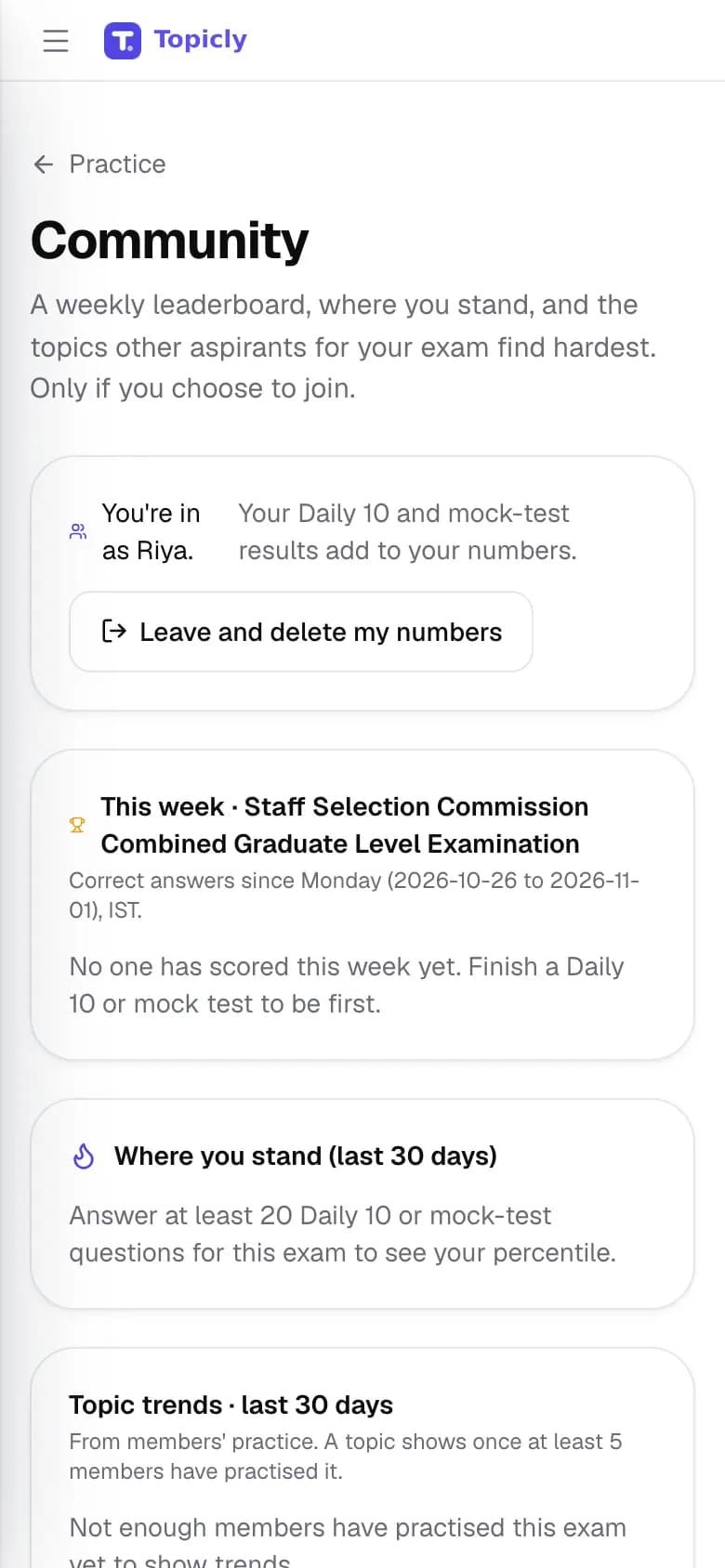
Weekly leaderboard
A weekly leaderboard, topic trends and your percentile among Topicly learners.
- How it works
- Join with a nickname. Only server-scored Daily 10 and mock results count; leave at any time to remove your numbers.
- How it helps
- Compare your practice with others preparing for the same exam, on your terms.
- 06
A question on WhatsApp
One practice question a day sent to WhatsApp.
- How it works
- Opt in from your profile, where the service has been set up.
- How it helps
- A daily nudge in the app you already open.
13 · LANGUAGES AND ACCESS
Study in the language you think in
Use the app in English or Hindi, get tutor replies in eleven languages and keep studying on a slow connection.
Sounds familiar? “I understand it better in Hindi.”
- 01
English or Hindi interface
Menus, buttons and pages in English or Hindi.
- How it works
- Switch from the language menu or your profile; the change applies right away.
- How it helps
- You can navigate without second-guessing a single label.
- 02
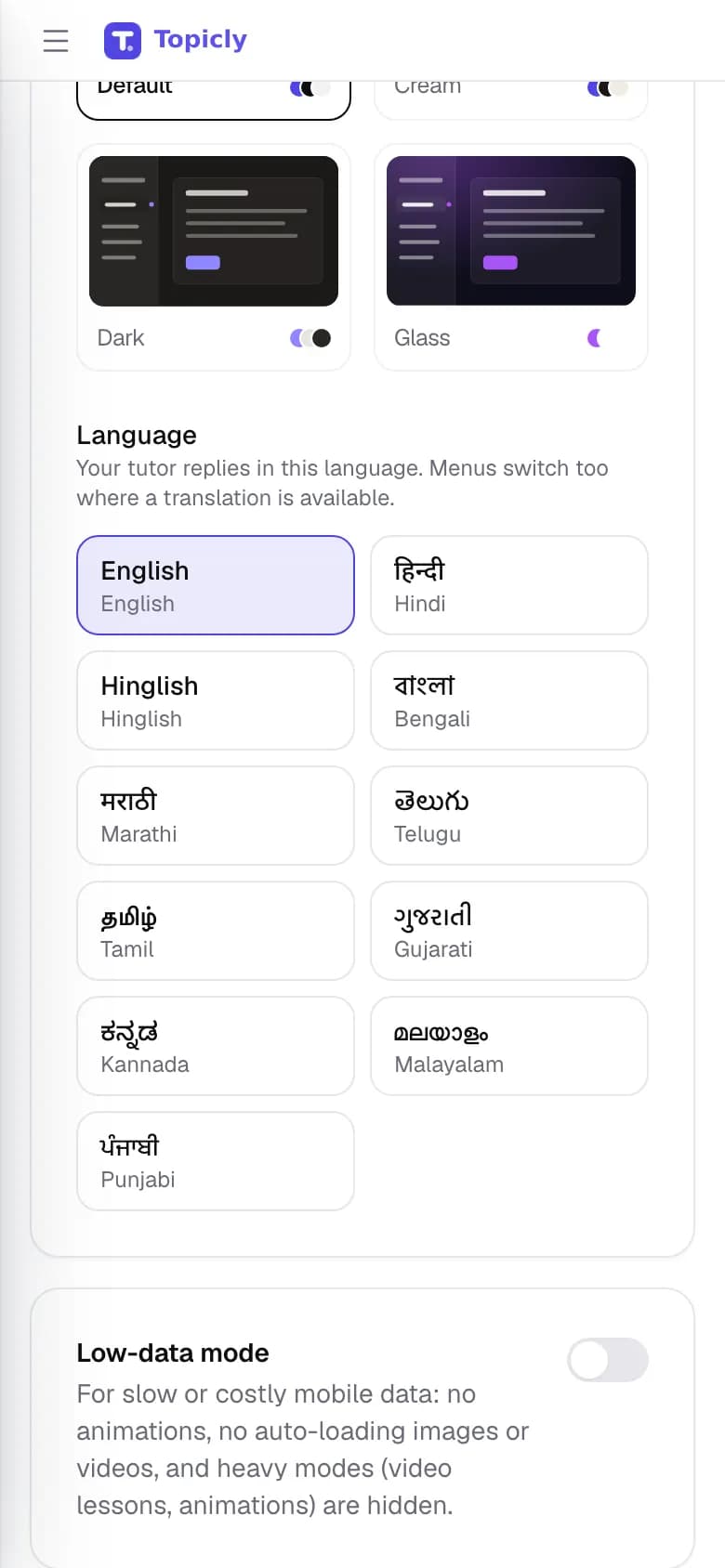
Tutor replies in eleven languages
English, Hindi, Hinglish, Bengali, Marathi, Telugu, Tamil, Gujarati, Kannada, Malayalam and Punjabi.
- How it works
- Pick a language and Sia replies in it in every study mode. Menus for languages other than English and Hindi stay in English.
- How it helps
- Concepts land faster in the language you think in.
- 03
Bilingual questions
An English/Hindi switch on mock questions that have translations, plus on-demand translation of quiz questions and answers.
- How it works
- Use the language switch in a mock, or the Translate menu under a question or answer.
- How it helps
- Practise in the language you will choose on exam day.
- 04
Hindi syllabus pages
Public syllabus pages for every exam, also published in Hindi.
- How it works
- Open the Hindi syllabus section from the site, or switch language on any syllabus page.
- How it helps
- Plan your preparation in Hindi from the very first step.
- 05
Low-data mode
Fewer animations and lighter media on your device.
- How it works
- Turn it on from your profile when your connection is slow or data is limited.
- How it helps
- Topicly stays usable on patchy mobile data.
- 06
Your data, your choice
Download your account and study data, or delete your account.
- How it works
- Both are in your profile, under Your data.
- How it helps
- You stay in control of what is stored about you.
HINDI, ENGLISH AND REGIONAL LANGUAGES
Learn in the language you think in.
Topicly’s menus are in English and Hindi. Sia, the AI tutor, can reply in any of these 11 languages, and you can translate quiz questions and answers on demand. Mock questions offer an English/Hindi switch where translations exist.
How language support works- EnglishMenus + tutor
- हिन्दीMenus + tutor
- HinglishTutor replies
- বাংলাTutor replies
- मराठीTutor replies
- తెలుగుTutor replies
- தமிழ்Tutor replies
- ગુજરાતીTutor replies
- ಕನ್ನಡTutor replies
- മലയാളംTutor replies
- ਪੰਜਾਬੀTutor replies
STRAIGHT TALK
A study companion, not a shortcut.
- No guaranteed results. Topicly helps you plan, practise and revise. Your selection depends on your preparation and the exam itself.
- AI can be wrong. Sia, generated questions, notes and translations can contain mistakes. Check important facts against your books and official sources.
- Progress is what you record. Your syllabus percentage, streak and weak topics come from what you mark and practise on Topicly. Study time counts the minutes you are active in quizzes, mocks, revision and chats with Sia.
- Availability varies. Some features depend on your account, administrator settings and connected services. Previous-year papers appear only when they have been uploaded.
- Free to start. Paid plans on the pricing page are proposed and cannot be bought today.
YOUR NEXT STEP
One topic today. One step closer.
Find your exam, open a topic and see how Topicly fits your preparation.